Posts

How to Set Up a Pull Request in Azure DevOps

Image
  When several developers are working in same project, we need to merge our code to a single branch. Before we do that, it’s important to ensure that the new feature we just created is built correctly.   What is a Pull Request? A pull request (PR) is more than just a notification it’s a dedicated forum for discussing the proposed feature. If there are any problems with the changes, teammates can post feedback in the pull request and the feature by pushing follow-up commits, which allows you to save your changes to the repository. This task is monitored directly within the pull request (PR). Why you Should Do a Pull Request? For a successful project collaboration, it's crucial for every developer to grasp the project's architecture and comprehend the functionality of the remaining code. In this scenario, a pull request (PR) proves beneficial due to the following reasons: ·        It guarantees that team members are familiar with sec...
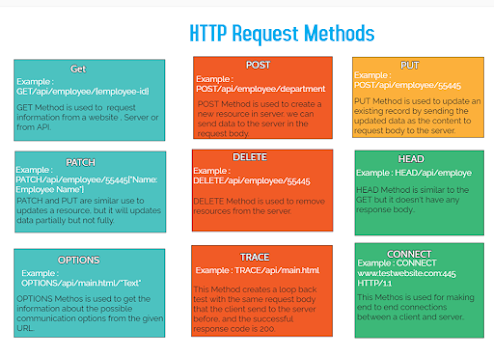
HTTP Request Methods

Image
  1. 𝗚𝗘𝗧 : GET Method is used to request information from a website, Server or from API. Example: GET/api/employee/{employee-id}   2. 𝗣𝗢𝗦𝗧 : POST Method is used to create a new resource in server. We can send data to the server in the request body. Example: POST/api/employee/department   3. 𝗣𝗨𝗧 : PUT Method is used to update an existing record by sending the updated data as the content to request body to the server. Example: POST/api/employee/55445   4. 𝗗𝗘𝗟𝗘𝗧𝗘 : DELETE Method is used to remove resources from the server. Example: DELETE/api/employee/55445   5. 𝗣𝗔𝗧𝗖𝗛 : PATCH and PUT are similar use to updates a resource, but it will update data partially but not fully. Example: PATCH/api/employee/55445{"Name: Employee Name"}   6. 𝗛𝗘𝗔𝗗 : HEAD Method is like the GET but it doesn't have any response body. Example: HEAD/api/employee   7. 𝗢𝗣𝗧𝗜𝗢𝗡𝗦 : OPTIONS Method is used to get the informati...

Make a field focus and required dynamically in PowerApps

Image
  This tutorial will we learn how to improve user experience with SetFocus and make field as required in Power App. SetFocus() function in Power Apps The SetFocus is used to move an input focus to specific control. the users Keystrokes are the received by that control allowing them to enter text in that input control. When should we use SetFocus function? User can use SetFocus function for the below application. ·        When a screen is displayed to focus the first input control with onvisible property of the screen. ·        Newly exposed control or enabled input control to guide the user that what comes next to enter data faster. Limitations for SetFocus function: This function can be used for controls. Text input control Image control Label Control Icon Control Button control   Syntax   SetFocus(Control) The SetFocus function gives a control the input focus.   Implement...

Web API Using Power Apps Custom Connector

Image
  In this tutorial, we will discuss how to create ASP .Net Web application and use this web API in power app using custom connector. 1.      Create a new ASP .Net Web application project using Visual Studio 2.      Build, Deploy & Secure a Web API in Azure 3.      Connect API To Power Apps Using Custom Connector   1.      Create a new ASP .Net Web application project using Visual Studio Open the visual studio 2019 and select ASP.NET web application (.Net Framework) and give the project name and click on Create. On the next screen as shown below screen short select Web API and click on create. Add a new empty controller to the project. Right click on the “Controllers” folder & select Add -> Controller -> Web API 2 Controller -Empty. Name this "ProductsController" as shown in below screen shorts. The Project structure look like below format. Next step right click on the “Mod...